











posted from Telligent forums
The day, I upgraded the Community Server 2007 to 2008 in IIS7 (Windows Server 2008), and encountered one problem. The tag cloud links became ooo+xxx when the tag include space character. Of course, the link was broken.
The message from IIS as below
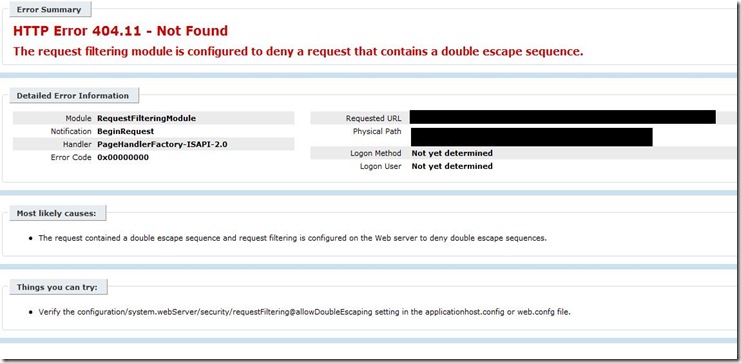
Most likely causes: The request contained a double escape sequence and request filtering is configured on the Web server to deny double escape sequences.
Things you can try:Verify the configuration/system.webServer/security/requestFiltering@allowDoubleEscaping setting in the applicationhost.config or web.confg file.
The discussion in the Telligent is as windows server 2008 - IIS7 - tags with space in name give 404.
The the clear steps as this KB.
- Locate the following directory: %windir%System32inetsrvconfig
- Open the applicationHost.config file in a text editor such as Notepad.
- In the applicationHost.config file, locate the following code:
<section name="requestFiltering" overrideModeDefault="Deny" /> - Replace the code that you found in step 3 with the following code:
<section name="requestFiltering" overrideModeDefault="Allow"/> - Locate the following diretory:
%windi%System32com - Double-click the directory of the SOAP-enabled server that you want to activate.
- Open the web.config file in a text editor such as Notepad.
- In the web.config file, locate the following code:
</configuration> - Replace the code that you found in step 8 with the following code:
<system.webServer>

<security>

<requestFiltering allowDoubleEscaping="True"/>

</security>

</system.webServer>

</configuration>
- Automate Business Processes with Power automate
- Dyamics 365 for Sales - Lead Management
- Dyamics 365 for Sales - Lead Qualification
- Dyamics 365 and Microsoft Teams Integration
- How to copy an entire plan when using Tasks by Planner and To Do
- How to create a custom program entity with Project for the Web
- How to create a flow to promote a request to a project in Project for the Web
- How to customize Project for the Web with custom entities
- How to use icons as graphical indicators with Project for the Web
- How to use Power BI to create a data model for dynamic reports and dashboards
- How to use Project for the Web custom entities with Power BI reports
- Configuring security in Microsoft Project Online
- Project for the Web Demonstration of fully configured environment
- Start Page updated experience
- How to use MS Teams & Power Automate to us a SharePoint list as an ideation list with Project Online
- What is Project for the Web

