











In order to clear the cache in Microsoft Project Professional we will start with the product opened with a blank project schedule as shown below.
Important, DO NOT have any project schedules opened at this time in Microsoft Project.
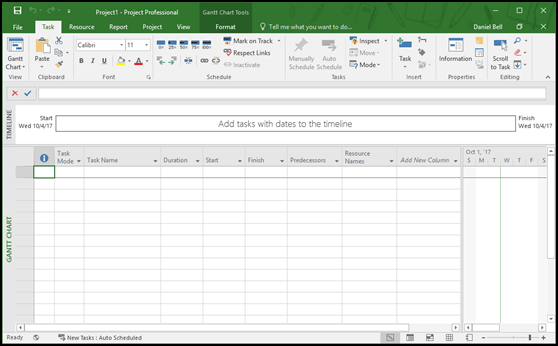
Continue with the following steps:
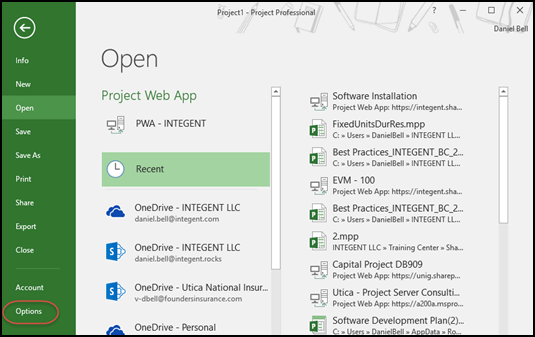
1. Click the File tab then select Options in the Quick Launch.
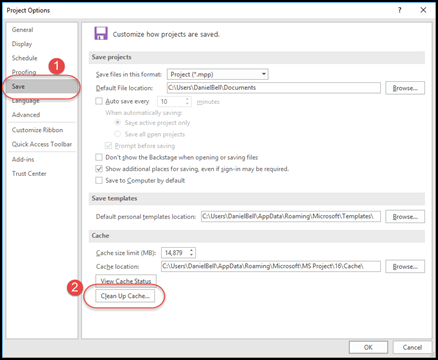
2. Once in the Project Options dialog, select the Save (1) page, then click the Clean Up Cache (2) button.
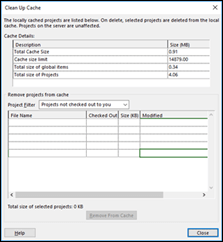
3. In the Clean Up Cache dialog perform the following:
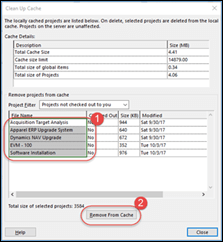
a. Select all the projects in the Remove projects from cache section. Use Shift-click to simplify selection.
b. Click the Remove From Cache button.
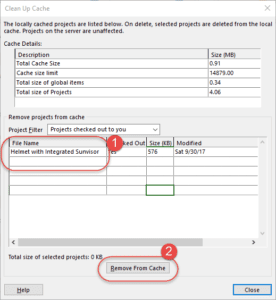
Note: The screenshot on the left is before we cleared projects from the cache. The screenshot shows the cleared cache.
4. While still in the Clean Up Cache dialog, change the Project Filter to Projects checked out to you via the drop down list box.

5. If there are any projects showing up in the cache now, perform the same procedure and clear them from the cache (Important, ensure you do not currently have any projects opened!)
a. Select all the projects in the Remove projects from cache (1) section. Use Shift-click to simplify selection.
b. Click the Remove From Cache (2) button.
6. Click the Close button when finished.
We also have a short Quick Tip video of this procedure: How To Clear the Microsoft Project Cache: Video.
If you have any need for additional Microsoft Project Online Training to increase your knowledge, or you would like to utilize our Microsoft Project Online Consulting or Microsoft PPM Consulting services to help you get the most out of Microsoft Project Online, please Contact UsContact Us. We'd like to hear from you!
Need Microsoft Project Online Support? We've Got Support!
Related Links
- How To Clear the Microsoft Project Cache: Video
- Project Server 2010: The copy of this project in the Local Project Cache may be damaged.
- Microsoft Project Online Training – Creating a Major Milestone Report
- Error opening the Project Plan in Project Professional from PWA
- Project for the Web Consulting
- Microsoft Project Training
- Microsoft Project Online Consulting
- Microsoft Project Online Migration
- Microsoft Project Online Training
- Dynamics 365 Consulting
- Dynamics 365 Project Operations Consulting
- Microsoft Power Automate Consulting
- Microsoft Power BI Consulting
- Microsoft SharePoint Online Consulting
Hitting issues like this more often than you'd like? Our support team handles Microsoft Project and PPM environments day to day — setup, licensing, troubleshooting — so your people stop losing hours to it.
Talk to our support team
