











Microsoft Project Online is Microsoft’s cloud-based enterprise solution for project and portfolio management (PPM). Here we provide some details about the product as well as licensing information as of the date of this post.
So What's included in the Microsoft PPM Office 365 Cloud Solution?
Microsoft Project Online
Microsoft Project Online is a service offering that is available in the Microsoft cloud. The features provided by the product are beneficial to many different roles.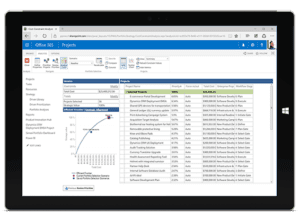 Some of these roles include resource managers, team members, portfolio managers, and others. Project Professional is used for the day-to-day management of a project manager's project plan. The Microsoft PPM solution provides features such as the ability to view projects across the enterprise, portfolio analysis, and much more. These other features are often useful to other roles in a given company.
With Microsoft's PPM solution, a company needs no infrastructure! Users connect their desktop project professional desktop application to project online and "publish" their projects to the cloud.
Microsoft Project Online Professional
Project Online Professional is the cloud version of the desktop client Project Professional. This product is no longer part of a CD installation on your desktop computer. Now it is downloaded and installed from the Office 365 portal Microsoft Cloud.
MS Project can be used as a standalone tool, as well as connected to either Microsoft Project Server or Microsoft Project Online. When connected to either of these products many new features are realized that are beneficial to all roles, a well as the project team.
Project Web App
Project Web App is the browser interface all roles other than the project manager use to interact with data within the solution. Project Web App is available both in Microsoft Project Server and in Project Online. Project Web App supports many web browsers and provides each role access to specific data within the Microsoft PPM solution.
Sound interesting? Integent provides training courses for Microsoft Project Online Training and Microsoft Project Server Training.

