




not add domain!
Using Escalation rates and the affects of a Resources Rate changing Mid-month - Integent
Call Us Today! 1.800.895.3254
sales@integent.com
Consulting & Advisory
Consulting / Advisory helps business and IT leaders make better decisions and turn strategy into execution-ready initiatives. Most engagements start with a Discovery Initiative to confirm outcomes, and build a roadmap.

Learn About Consulting
Data & AI
Data & AI delivers modern data platforms, analytics, and practical AI solutions—from assistants to agents—built on enterprise cloud tools. Integent helps you govern, deploy, and drive adoption so solutions stick and scale across your organization.
Learn About Data & AI
Support
Support keeps your solution stable, secure, and aligned with day-to-day operations. We combine functional and technical expertise with proactive monitoring, preventive maintenance, and 24/7 coverage for critical incidents.

Learn About Support
Microsoft Planner Premium
Leverage proven knowledge and experience to design and deploy Microsoft Planner Premium so your organization can manage projects, work, and resources more effectively across teams.
Learn More About Planner Premium
OnePlan
Integent can help you ensure continuity beyond Project Online by deploying OnePlan in the Microsoft Cloud—connecting portfolio governance, resources, and delivery execution for results.
Learn More About OnePlan
Microsoft Dynamics 365
Ensure business continuity with a custom cloud solution that connects your sales, service, finance, and operations teams to deliver measurable, predictable results.

Learn More About Dynamics 365
Microsoft Power Platform
Consisting of Power BI, Power Apps, Power Automate and Copilot Studio, the Microsoft Power Platform helps streamline and improve business functions.

Learn More About Power Platform
About Integent
Integent was founded in 2009 on the principles of building long-lasting relationships with customers, exceeding expectations, and providing outstanding customer service. 

We’re dedicated to providing a customized solution backed by our knowledgeable team of Microsoft experts.
Discover What Makes Us Different
News
Stay informed on Integent’s latest company updates and other important industry information. Our passion is customer success.
Read The Latest News
Videos
Learning new software doesn’t have to be difficult with our library of dozens of free training videos. Our video training always has something new.
Browse Our Training Video Library
Blog
Our industry experts share best practices and common pitfalls to avoid, in order to get the most out of your technology solutions.
Discover More

March 29, 2010

Using Escalation rates and the affects of a Resources Rate changing Mid-month


Below are the steps to clearly demonstrate the affect of using escalation rates in Cost Rate Tables in Project Server 2007.


STEP 1

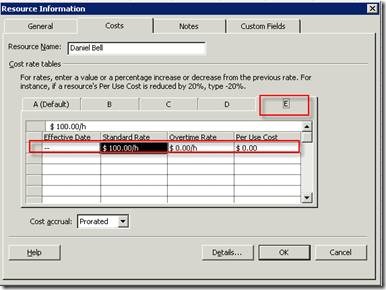
The first step in this process is to setup two different rate tables. I used tables D and E so as not to interfere with any cost figures on other projects

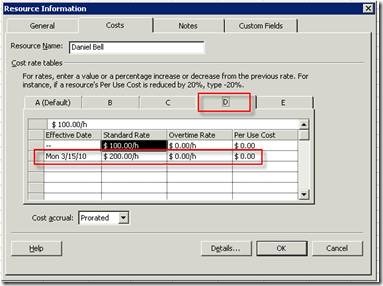
  • Rate Table D (Figure 1)
    • In this table, the resources rate is $100 hourly until the 15th of March, when it changes to $200 hourly. Therefore, all cost associated with this resources work prior to March 15th will be calculated at the rate of $100 hourly (when using this rate table). From March 15th on, all costs associated with this person’s work will be calculated at the rate of $200 hourly (when using this rate table).
  • Rate Table E (Figure 2)
    • In this table, the resources rate is $100 hourly at all times, as no escalation rate is defined. All costs associated with this person are calculated at $100 hourly (when using this rate table).
clip_image002

 Figure 1

clip_image004

 Figure 2 

STEP 2

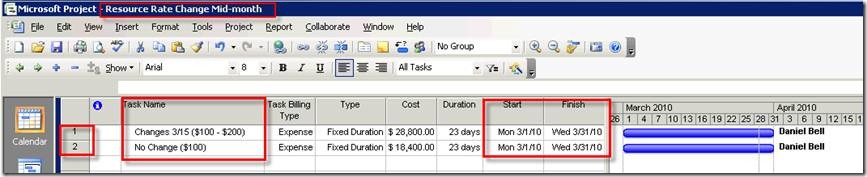
A project with two tasks was created and named Resource Rate Mid-month (Figure 3). Each task in this project is one calendar month in duration. The first task will reflect what costs are incurred when using the rate table in which the rate changes mid-month (D). The second task will reflect the costs incurred with the static rate table (E).
 

clip_image006

 Figure 3 

STEP 3

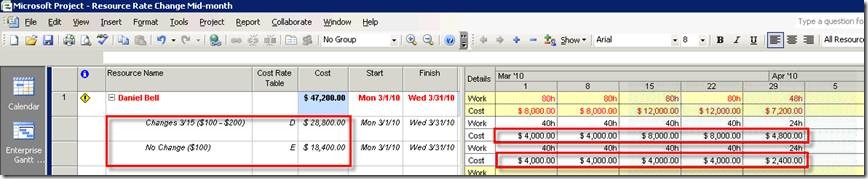
To clearly demonstrate the cost implications, we navigate to a Resource Usage view. The first task named Changes 3/15 ($100 - $200), specifies Cost Rate Table D, which has the escalated rate of $200 come into affect March 15th. The second task named No Change ($100), specifies Cost Rate Table E, which specifies a $100 rate throughout.

Comparisons (Figure 4)

  • The first change noted is in the table value of Cost
    • The first task reflects a cost of $28,800
    • The second reflects a cost of $18,400
  • The second change to note is in the time-phased section of the view.
    • The first task shows that although the work remains consistent from full-week to full-week, the cost doubles as of the week of March 15th, from $4000 weekly to $8000 weekly. Since the resources rate was selected to change from $100 hourly to $200 hourly as of March 15th (figure 1 above), this is the expected result.
    • The second task reflects a consistent $4000 weekly as expected, since the rate remains constant throughout (figure 2 above).
clip_image008

Figure 4.

© Copyright 2026 | Integent.com | All Rights Reserved
linkedin facebook pinterest youtube rss twitter instagram facebook-blank rss-blank linkedin-blank pinterest youtube twitter instagram