



not add domain!
Adding a new resource rate effective on a specific date - Integent
Call Us Today! 1.800.895.3254
sales@integent.com
Consulting & Advisory
Consulting / Advisory helps business and IT leaders make better decisions and turn strategy into execution-ready initiatives. Most engagements start with a Discovery Initiative to confirm outcomes, and build a roadmap.

Learn About Consulting
Data & AI
Data & AI delivers modern data platforms, analytics, and practical AI solutions—from assistants to agents—built on enterprise cloud tools. Integent helps you govern, deploy, and drive adoption so solutions stick and scale across your organization.
Learn About Data & AI
Support
Support keeps your solution stable, secure, and aligned with day-to-day operations. We combine functional and technical expertise with proactive monitoring, preventive maintenance, and 24/7 coverage for critical incidents.

Learn About Support
Microsoft Planner Premium
Leverage proven knowledge and experience to design and deploy Microsoft Planner Premium so your organization can manage projects, work, and resources more effectively across teams.
Learn More About Planner Premium
OnePlan
Integent can help you ensure continuity beyond Project Online by deploying OnePlan in the Microsoft Cloud—connecting portfolio governance, resources, and delivery execution for results.
Learn More About OnePlan
Microsoft Dynamics 365
Ensure business continuity with a custom cloud solution that connects your sales, service, finance, and operations teams to deliver measurable, predictable results.

Learn More About Dynamics 365
Microsoft Power Platform
Consisting of Power BI, Power Apps, Power Automate and Copilot Studio, the Microsoft Power Platform helps streamline and improve business functions.

Learn More About Power Platform
About Integent
Integent was founded in 2009 on the principles of building long-lasting relationships with customers, exceeding expectations, and providing outstanding customer service. 

We’re dedicated to providing a customized solution backed by our knowledgeable team of Microsoft experts.
Discover What Makes Us Different
News
Stay informed on Integent’s latest company updates and other important industry information. Our passion is customer success.
Read The Latest News
Videos
Learning new software doesn’t have to be difficult with our library of dozens of free training videos. Our video training always has something new.
Browse Our Training Video Library
Blog
Our industry experts share best practices and common pitfalls to avoid, in order to get the most out of your technology solutions.
Discover More

July 18, 2013

Adding a new resource rate effective on a specific date

If you want to change a resource’s rate on all future assignments but maintain the original rate on past assignments, follow the steps below:

  1. In PWA, navigate to the Resource Center.
  2. Check the box next to the names of resources whose rates need to be adjusted.
  3. Click the Open icon on the ribbon at the top.
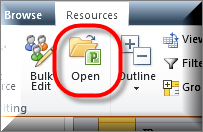
  4. PRoject picture
  5. The Enterprise Resource Global will open in MS Project Professional.
  6. Double Click the name of the resource you want to edit.
  7. Click on the Cost tab.
  8. Set the effective date for the new rate and enter the rate.
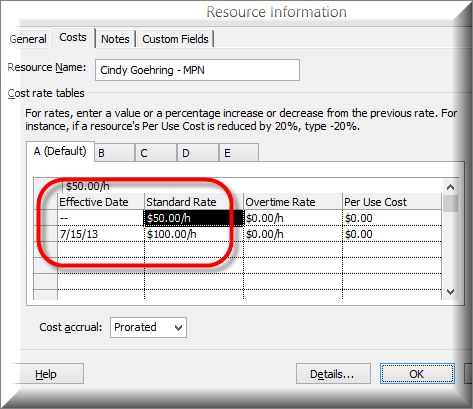
  9. PRoject picture
  10. Click OK.
  11. Save and Close the Enterprise Resource Global and be sure to check it in.

NOTE: YOU MUST CLOSE MS PROJECT PRO AND REOPEN IT BEFORE YOU WILL SEE THE NEW RATES APPLIED


Happy Scheduling! Open-mouthed smile

© Copyright 2026 | Integent.com | All Rights Reserved
linkedin facebook pinterest youtube rss twitter instagram facebook-blank rss-blank linkedin-blank pinterest youtube twitter instagram