








A three-way match compares the purchase order, the goods receipt and the vendor invoice before an invoice is paid. If all three agree on what was ordered, what arrived and what is being billed, the invoice can go to payment. If they don’t, it stops for review.
It is one of the oldest controls in accounts payable, and it still catches real money. It is also where AP teams lose hours, because most of the work is not the comparison itself. It is chasing the exceptions. This guide covers how three-way matching works, a worked example, how to set tolerances, and where automation helps.
What is a three-way match in accounts payable?
Three documents, created by three different people, and each confirms one thing:
- Purchase order (PO). Created by purchasing. Confirms what you agreed to buy, how many, and at what price.
- Goods receipt. Created by the warehouse or receiving team. Confirms what actually arrived.
- Vendor invoice. Created by the supplier. States what you are being asked to pay.
The value comes from that separation. No single person controls all three documents, so a mistake or a fraudulent charge has to get past independent records. AP compares them line by line: item, quantity, unit price, and total.
How the three-way match process works
An accounts payable three-way match usually follows the same six steps, whether it is done by hand or in software:
- Capture the invoice. Record the vendor, invoice number, PO number, line items and totals.
- Find the purchase order. Confirm it exists, is approved and still has an open balance.
- Find the goods receipts. Pull every receipt recorded against that PO.
- Compare line by line. Check quantity and unit price on each line, then the invoice total.
- Decide. If everything agrees within tolerance, approve the invoice for payment. If not, hold it and record why.
- Keep the evidence. Store the result with the documents, so an auditor can see who approved what and why.
The last step is easy to skip when a team is busy, and it is the one auditors ask about first. A match that nobody can prove happened is hard to defend later.
A three-way match example
Here is a three-line invoice for $1,330. The numbers are illustrative.
| Line | Purchase order | Goods receipt | Invoice |
|---|---|---|---|
| Bearings | 100 at $4.00 | 100 received | 100 at $4.00 |
| Motor mounts | 50 at $12.00 | 40 received | 50 at $12.00 |
| Seal kits | 200 at $1.50 | 200 received | 200 at $1.65 |
Line by line, the result looks like this:
- Bearings match. Pay $400.
- Motor mounts fail on quantity. Ten units were billed but not received. Pay for 40 ($480) and hold $120 until the rest arrives or the vendor issues a credit.
- Seal kits fail on price. The invoice is $0.15 per unit above the PO. Pay the agreed $300 and query the extra $30.
Without the match, you pay $1,330. With it, you pay $1,180 and hold $150 for review.
2-way vs 3-way vs 4-way match
Not every purchase needs the same level of checking. Invoice matching comes in three common levels, and the right one depends on what you are buying. A stricter match gives you more protection, but it also creates more work for every invoice.
| Match | What it compares | When to use it |
|---|---|---|
| 2-way | PO and invoice | Services, subscriptions, low-risk items with no physical delivery |
| 3-way | PO, goods receipt and invoice | Physical goods, the standard for most purchasing |
| 4-way | PO, goods receipt, inspection report and invoice | Goods that must pass quality inspection before you accept them |
Tolerances: when “close enough” is OK
A match that demands perfection floods AP with exceptions over rounding and freight. Most teams define tolerances: small differences that pass automatically. A common pattern combines a percentage and a dollar cap, for example 2% or $25 per line, whichever is lower. The right limits are a finance policy decision, and they should be written down.
A few situations deserve their own rule:
- Partial deliveries. Decide whether you pay for what arrived or hold the whole invoice.
- Freight and surcharges. These often appear on the invoice but not on the PO. Set a limit, or require them on the PO.
- Exchange rates. A PO in one currency and an invoice in another will rarely match exactly.
- Over-receipts. If a supplier ships more than ordered, decide who approves keeping it.
Review the limits after a few months. If nearly every exception gets approved, they are too tight. If overcharges get through, they are too loose.
Where manual three-way matching breaks
The logic is simple. The inputs are not. These cases take most of the time in a manual process:
- Missing or wrong PO number. Someone has to work out which order the invoice belongs to.
- Invoice before receipt. The invoice arrives first and waits, often with nobody tracking it.
- Partial receipts. One PO, three deliveries, two invoices, and the lines no longer line up.
- Different descriptions. The PO says one thing, the supplier’s invoice says another, and only a person knows they are the same item.
- Duplicates. The same invoice arrives by email and by post, or with a slightly different number. Duplicate invoice detection needs more than an exact match.
How AI checks a three-way match
Older OCR tools depend on templates and struggle when a supplier changes its layout. Current AI reads an invoice by meaning, so it can find the vendor, PO number and amounts in a layout it hasn’t seen before. The useful part is how that combines with fixed rules. A typical flow looks like this:
AI extracts the vendor, PO number, amounts and other key fields from the invoice.
The invoice is matched to the purchase order, and to goods receipts when your ERP provides them.
Rules check amounts against a tolerance, look for duplicates and compare the invoice with the contract.
Clean invoices move on. Exceptions go to a person, with the reason attached.
The principle that keeps this auditable: AI reads, rules decide, people approve. The AI doesn’t choose what gets paid. Your rules do, and a person handles anything they flag.
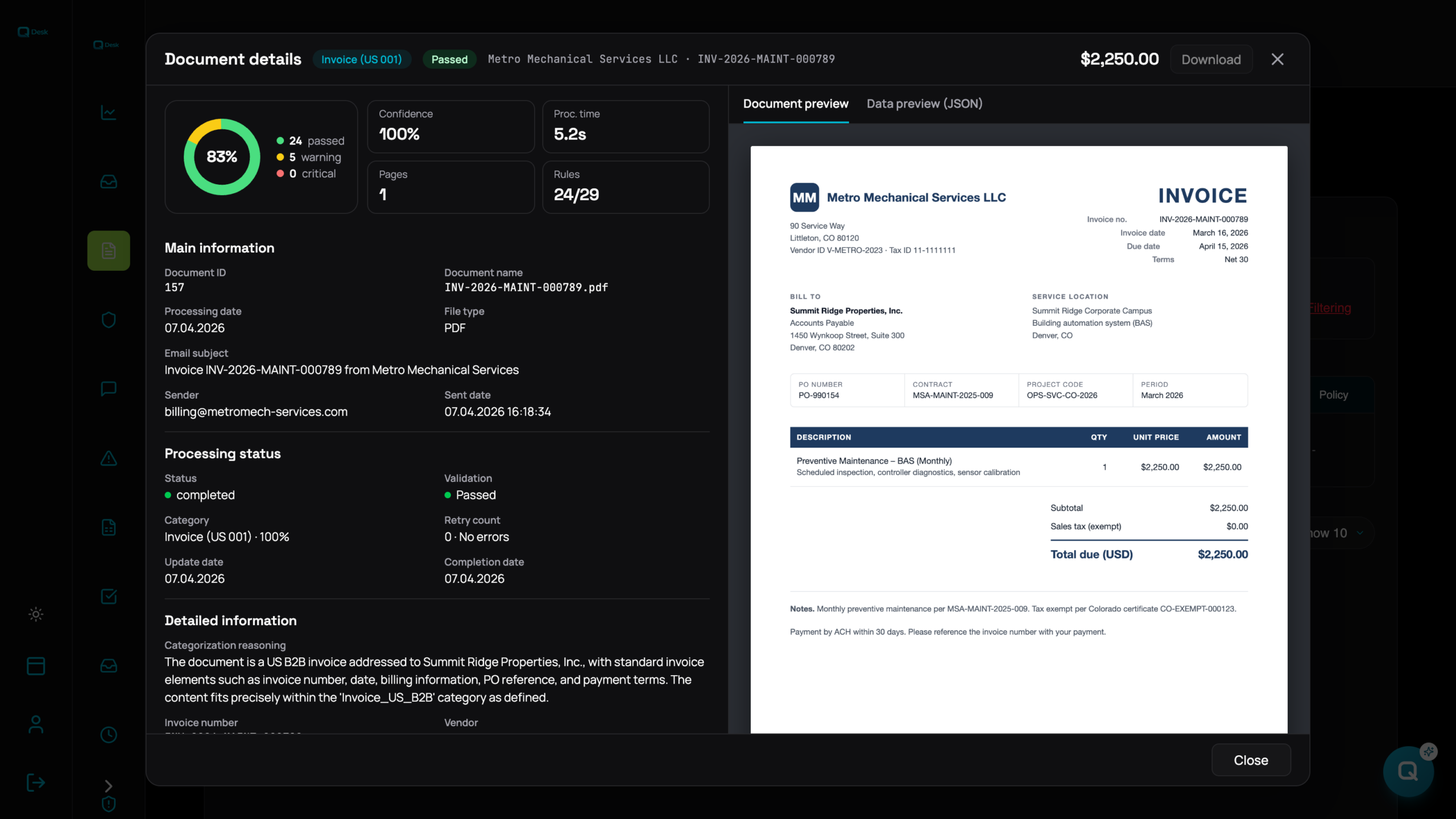
That is how invoice matching software such as QDesk, our accelerator for Microsoft 365, approaches the problem. We wrote more about running this kind of workflow on your own data in a custom AI agent in your own tenant.
What a three-way match does not catch
A passed match means the three documents agree with each other. It doesn’t mean they are right.
The classic gap is the contract. If the contract caps a job at $10,000 but someone raised the PO at $12,000, the PO, receipt and invoice all agree, and the $2,000 overcharge passes cleanly. Checking the invoice against the contract, as well as the PO, closes that gap.
Three-way match FAQ
Is a three-way match required?
It isn’t a universal legal requirement, but it is a standard internal control that auditors commonly look for. Your own policy and audit requirements decide where it applies.
What happens when a three-way match fails?
The invoice is held and routed for review. AP or the buyer finds the cause, then the vendor issues a credit, the PO is corrected, or the missing receipt is recorded.
Can a three-way match be automated?
Yes. ERP systems can match structured data, and AI adds the step of reading invoices that arrive as PDFs or emails. People still handle exceptions.
Do services need a goods receipt?
Usually there is nothing to receive, so teams use a 2-way match plus confirmation from the person who requested the work.
See how AI invoice validation checks every invoice against the PO and the contract, inside your Microsoft 365 tenant.
See AI invoice validation in Microsoft 365