











This is simply a brain dump from quite a bit of SSRS report development I was doing this past weekend. Basically I have one SSRS report that I want to call another, however, I want it to open in a new window. Yes, seems easy, however, it’s somewhat complex. The first few URLs below are all using the HTML viewer with either one or multi value parameters being passed in it. The second set of URLs use the Report Viewer webpart. The biggest advantage of the Report Viewer webpart for me personally, was that you could control the height of the rows of the report and make it so they DO NOT increase. The issue I was having with the HTML view was although I set the cells to NOT allow a height increase, the height was indeed increasing. This was making my graphical indicators when using the Indicators tool look horrible. fortunately the Report Viewer webpart does NOT exhibit this behavior. 
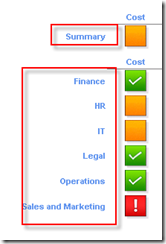
This is a partial screenshot of the calling report. The Summary line will pass two multi-value parameters to the destination report (selected departments and selected project status’). The Department level rows below the summary level will pass the department for the selected row, and a multi-value parameter for project status.
HTML Viewer URLs
two mult-value parameters from current report passed
="javascript:void(window.open('http://mpntprj10f/reportserver?http://mpntprj10f/PWA/ProjectBICenter/Report%20Pack/Enterprise%20Projects.rdl&rs:Command=Render&Department=" + JOIN(Parameters!Department.Value, "&Department=") & "&ProjectStatus=" + JOIN(Parameters!ProjectStatus.Value, "&ProjectStatus=")+"'))"
="javascript:void(window.open('http://mpntprj10f/reportserver?http://mpntprj10f/PWA/ProjectBICenter/Report%20Pack/Enterprise%20Projects%20KPIs.rdl&rs:Command=Render&Department=" + JOIN(Parameters!Department.Value, "&Department=") & "&ProjectStatus=" + JOIN(Parameters!ProjectStatus.Value, "&ProjectStatus=")+"'))"
One single value parameter based on field value and one mult-value parameter, both based on current report
="javascript:void(window.open('http://mpntprj10f/reportserver?http://mpntprj10f/PWA/ProjectBICenter/Report%20Pack/Enterprise%20Projects.rdl&rs:Command=Render&Department=" +Fields!Project_Departments.Value+ "&ProjectStatus=" + JOIN(Parameters!ProjectStatus.Value, "&ProjectStatus=")+"'))"
Report Viewer WebPart URLs
No Parameters passed
="javascript:void(window.open('http://mpntprj10f/PWA/ProjectBICenter/_layouts/ReportServer/RSViewerPage.aspx?rv:RelativeReportUrl=/PWA/ProjectBICenter/Report%20Pack/Enterprise%20Projects%20KPIs.rdl'))"
Single hardcoded parameter passed
="javascript:void(window.open('http://mpntprj10f/PWA/ProjectBICenter/_layouts/ReportServer/RSViewerPage.aspx?rv:RelativeReportUrl=/PWA/ProjectBICenter/Report%20Pack/Enterprise%20Projects%20KPIs.rdl&rp:Department=IT'))"
Once hardcoded parameter and one multi-value parameter
="javascript:void(window.open('http://mpntprj10f/PWA/ProjectBICenter/_layouts/ReportServer/RSViewerPage.aspx?rv:RelativeReportUrl=/PWA/ProjectBICenter/Report%20Pack/Enterprise%20Projects%20KPIs.rdl&rp:Department=IT" + "&rp:ProjectStatus=" + JOIN(Parameters!ProjectStatus.Value, "&rp:ProjectStatus=")+"'))"
One single value parameter based on field value and one mult-value parameter, both based on current report
="javascript:void(window.open('http://mpntprj10f/PWA/ProjectBICenter/_layouts/ReportServer/RSViewerPage.aspx?rv:RelativeReportUrl=/PWA/ProjectBICenter/Report%20Pack/Enterprise%20Projects%20KPIs.rdl&rp:Department=" +Fields!Project_Departments.Value+ &

