




not add domain!
Microsoft Project Online Quick Start Guides - Integent
Call Us Today! 1.800.895.3254
sales@integent.com
Consulting & Advisory
Consulting / Advisory helps business and IT leaders make better decisions and turn strategy into execution-ready initiatives. Most engagements start with a Discovery Initiative to confirm outcomes, and build a roadmap.

Learn About Consulting
Data & AI
Data & AI delivers modern data platforms, analytics, and practical AI solutions—from assistants to agents—built on enterprise cloud tools. Integent helps you govern, deploy, and drive adoption so solutions stick and scale across your organization.
Learn About Data & AI
Support
Support keeps your solution stable, secure, and aligned with day-to-day operations. We combine functional and technical expertise with proactive monitoring, preventive maintenance, and 24/7 coverage for critical incidents.

Learn About Support
Microsoft Planner Premium
Leverage proven knowledge and experience to design and deploy Microsoft Planner Premium so your organization can manage projects, work, and resources more effectively across teams.
Learn More About Planner Premium
OnePlan
Integent can help you ensure continuity beyond Project Online by deploying OnePlan in the Microsoft Cloud—connecting portfolio governance, resources, and delivery execution for results.
Learn More About OnePlan
Microsoft Dynamics 365
Ensure business continuity with a custom cloud solution that connects your sales, service, finance, and operations teams to deliver measurable, predictable results.

Learn More About Dynamics 365
Microsoft Power Platform
Consisting of Power BI, Power Apps, Power Automate and Copilot Studio, the Microsoft Power Platform helps streamline and improve business functions.

Learn More About Power Platform
About Integent
Integent was founded in 2009 on the principles of building long-lasting relationships with customers, exceeding expectations, and providing outstanding customer service. 

We’re dedicated to providing a customized solution backed by our knowledgeable team of Microsoft experts.
Discover What Makes Us Different
News
Stay informed on Integent’s latest company updates and other important industry information. Our passion is customer success.
Read The Latest News
Videos
Learning new software doesn’t have to be difficult with our library of dozens of free training videos. Our video training always has something new.
Browse Our Training Video Library
Blog
Our industry experts share best practices and common pitfalls to avoid, in order to get the most out of your technology solutions.
Discover More

July 30, 2014

Microsoft Project Online Quick Start Guides

Hello!

On a regular basis we get questions from customers and others asking where they may be able to find more information on how to use, or get started, with Microsoft Project Online.  With the simplicity in which people can subscribe to Microsoft Project Online, the sign-ups are numerous.  Unlike other office products that are intuitive in nature to learn, Microsoft Project Online requires instruction.

Well there certainly are plenty of resources.  All of which can be accessed directly from the home page of Project Online home page.  Note the New to Microsoft Project Online tile shown below:


Clicking on this tile will launch a web page titled Get started with Microsoft Project Online
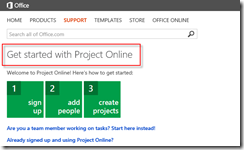
image

From here you are able to access quite a bit of information on using the product.  For instance, clicking on the Already signed up and using Project Online link will open a web page explaining via text and a video how to add users to the Project Online tenant via the Office 365 portal:
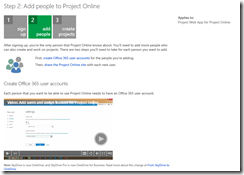
image

Dig a little deeper and you will locate a web page with an abundance of information on using Project Online.  From creating projects to working with tasks, or resource management and timesheet usage, there is plenty to get one started.
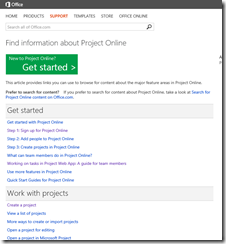
image

In case you cannot find the page above, here’s are several helpful URLs

  • Getting Started with Project Online (very comprehensive info for just about every task): http://office.microsoft.com/en-us/office365-project-online-help/find-information-about-project-online-HA104002027.aspx?CTT=5&origin=HA104167823
  • Adding people to Project Online: http://office.microsoft.com/en-us/office365-project-online-help/step-2-add-people-to-project-online-HA104068864.aspx?CTT=5&origin=HA102858793
  • Track work in Project Online (for Team Members): http://office.microsoft.com/en-us/office365-project-online-help/track-work-in-project-online-HA104237857.aspx?CTT=5&origin=HA102858793
  • What can team members to in Project Online: http://office.microsoft.com/en-us/office365-project-online-help/what-can-team-members-do-in-project-online-HA104220591.aspx?CTT=5&origin=HA104237857
  • Working with tasks in Project Online (downloadable guide): http://www.microsoft.com/en-us/download/details.aspx?id=41564
  • Project Online and Project Server 2013 quick start guides: http://office.microsoft.com/en-us/project-server-help/quick-start-guides-for-project-online-and-project-server-2013-HA104167823.aspx


Of course videos and articles are no substitute for leveraging the experience of a partner that has been using and deployment the product to many different types of customers, each with different requirements.&am


© Copyright 2026 | Integent.com | All Rights Reserved
linkedin facebook pinterest youtube rss twitter instagram facebook-blank rss-blank linkedin-blank pinterest youtube twitter instagram