











Hi again. To start, I have to say that I’m setting a record here. I’ve posted 6 weeks in a row now and I think that deserves some accolades, don’t you? 
Continuing our series on 8 Steps to Scheduling Success, in this post we’ll take a look at Step 5: Entering Deadlines. Before we can talk about deadlines, however, there are a few points I’d like to make about constraints in Microsoft Project Professional. Other than the default constraints, which won’t be discussed here, there are 6 types of constraints that can be applied to tasks:
- Start No Earlier Than
- Finish No Earlier Than
- Start No Later Than
- Finish No Later Than
- Must Start On
- Must Finish On
We will focus on the ‘Finish No Later Than’ constraint because it is probably the most commonly used on and is also one of the most dangerous. Okay, so dangerous might be a bit of an exaggeration, but hopefully you get the idea. Using these types of constraint add a layer of complexity to the schedule that can be difficult to manage. If you’ve been using ‘Finish No Later Than’, I’m willing to bet you have seen the following message on several occasions:
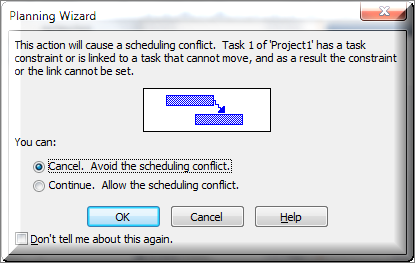
The only thing I find helpful about this particular warning is the fact that when it shows up, I know I am doing something that will cause me to miss a constraint date. The message itself doesn’t exactly point me to the offending task which, in my opinion, is quite frustrating. I’m wondering if you are as guilty as I have been about selecting ‘Continue’ and then checking ‘Don’t tell me about this again’. After all, they say “ignorance is bliss”.
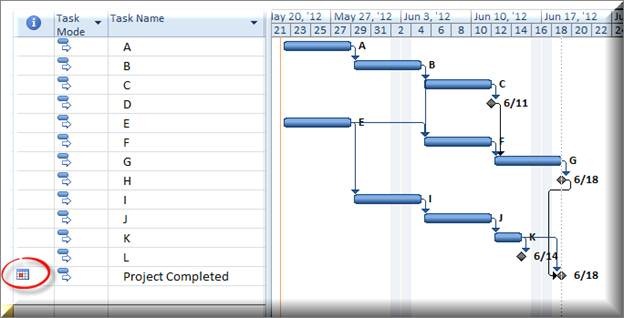
From this point forward, consider not ever using a ‘Finish No Later Than’ constraint again. That’s right, I said NOT EVER! Some of you are thinking to yourselves that you HAVE to use the constraint because you have hard deadlines you have to meet in your schedule. There is a better way to capture them and I’ll tell you what that is right after I show you why ‘Finish No Later Than’ constraints are a bad idea. In the image below, the milestone ‘Project Completed’ has a ‘Finish No Later Than’ constraint on 6/19/12. You know there is a ‘No Later Than’ constraint because of the calendar icon in the indicator column with a red dot on it. (a blue dot would indicate a ‘No Earlier Than’ constraint)
If I make a change to a task that would cause this milestone to push out beyond 6/19/12, notice what happens:
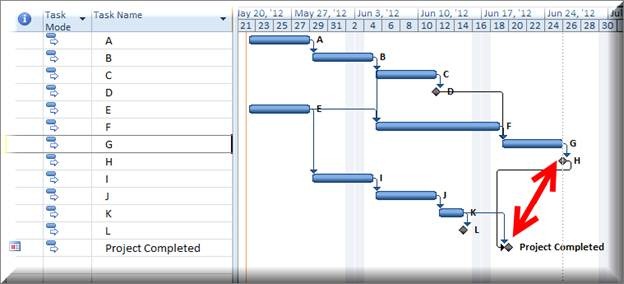
The schedule reflects that the project will be completed on 6/19/12 (the ‘Finish No Later Than’ date) but another milestone isn’t completing until 6/25/12. This makes it look as though your project is completing on time when it really isn’t. While it is easy to see the inconsistency in this particular instance, that isn’t always the case.
Avoid the headache of trying to figure it out and use a deadline in place of a ‘Finish No Later Than’ constraint. I’ve found that many project managers aren’t even aware of the deadline feature in Microsoft Project. So here are the steps to set one:
- Double click the task name or highlight it and select information from the Task Ribbon.
- In the Task Information dialogue box, go to the advanced tab and enter the deadline date in the deadline field
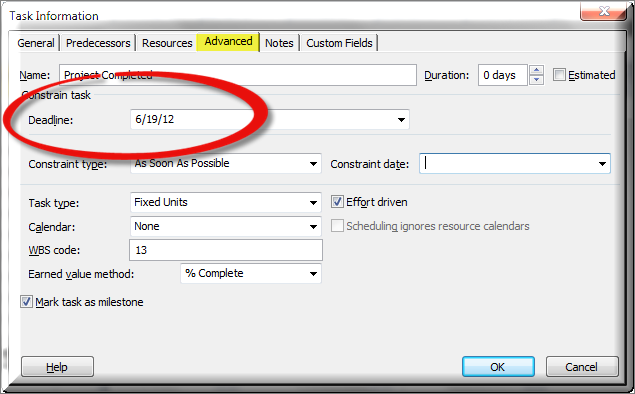
A downward pointing green arrow appears on the Gantt Chart to let you know there is a deadline date. Now, watch what happens when I make the same change to the schedule that I made before, causing the end milestone to push beyond our deadline date:

