









The reflex, when someone brings an AI idea to the table, is to go shopping. Which vendor sells this? What’s the per-seat price? How fast can we sign the order? And for a lot of problems, buying is the right call — there’s no point building your own email client. The AI worth building yourself is different: a custom AI agent, shaped to one job in your business.
But your most valuable AI use cases are usually the ones no vendor sells off the shelf, because they run on your contracts, your workflow, and your data. For those, an AI agent doesn’t have to be one more subscription that pipes your data to someone else’s cloud. It can live inside the Microsoft environment you already pay for — Microsoft 365, Azure, the Power Platform — on your infrastructure, under your governance. We built one to prove the point. The build worked. The interesting part is everything that broke on the way.
The custom AI agent we built, and why
We picked a boring, expensive, universal back-office automation problem: reading supplier invoices. Every month an AP team receives dozens or hundreds of PDFs by email, and someone opens each one, reads it, types the numbers into a system, and checks them against the rules — by hand. It’s slow, and it’s exactly where money leaks: across industries, benchmarks from the Institute of Finance & Management put duplicate and erroneous payments at roughly 1–2% of everything a company pays out in manual shops — the kind of quiet, repeated error a tired human misses and a consistent agent doesn’t.
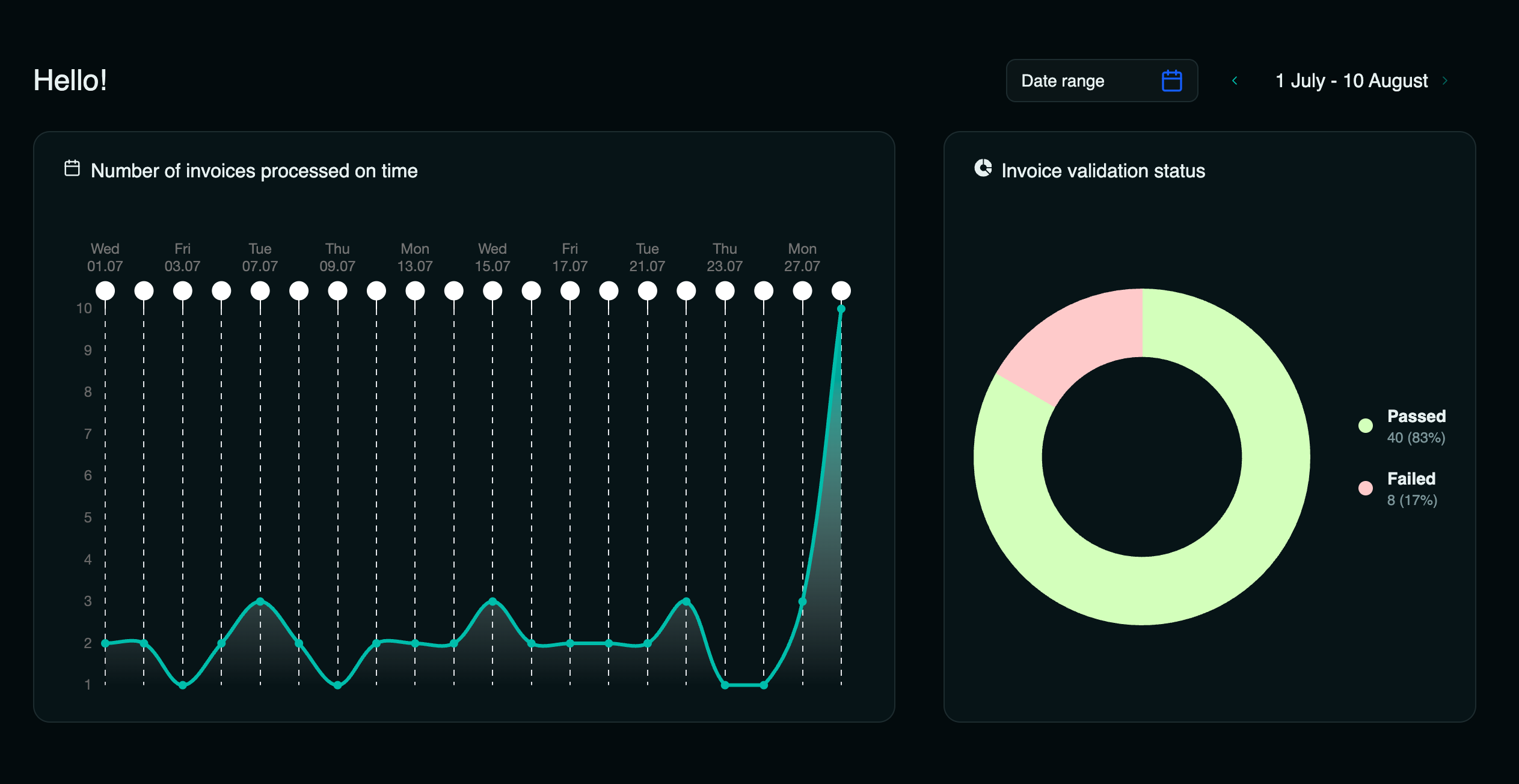
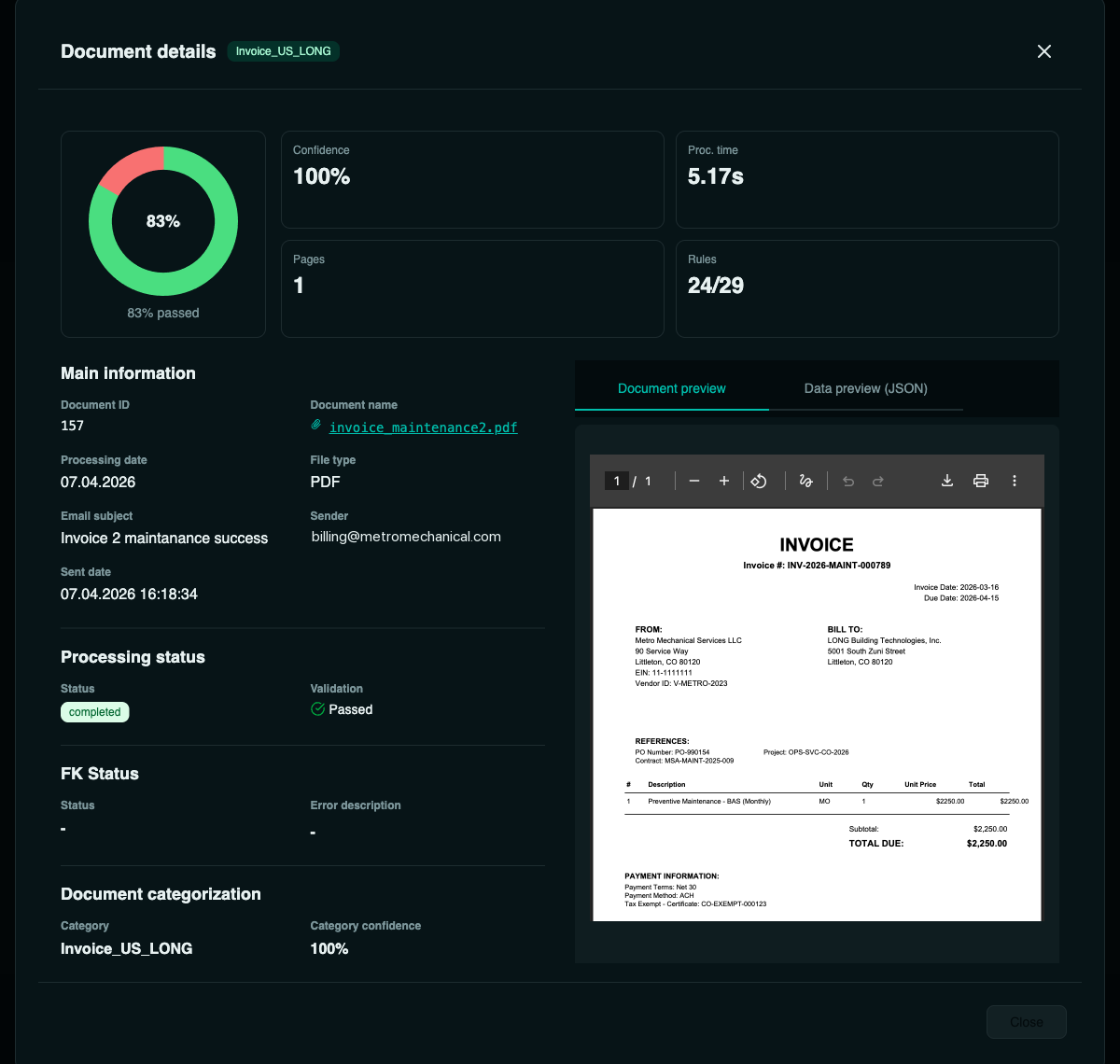
So the agent’s job is simple to state. Watch a mailbox. When an invoice arrives, read it, pull out the fields that matter, check them, and put the result on a dashboard — before anyone in finance touches it. Under the hood that’s one pipeline: email → OCR → extraction (~55 US invoice fields) → 23 validation rules → dashboard, in under a minute per invoice.
What broke first
None of the hard parts were the AI. Here, in order, is what actually fought back.
Every vendor’s invoice looks different
There is no standard invoice. One vendor writes “Bill To,” the next writes “Customer”; one has “PO #,” another buries “Purchase Order” in a paragraph. Templates that key off position break the moment a new supplier sends a slightly different layout. The fix was to stop matching layouts and start extracting by meaning — so a vendor we’ve never seen still gets read correctly, with no per-vendor mapping to maintain.
Reading the text is easy; trusting the fields is the job
Pulling words off a page is largely a solved problem. Knowing whether to believe them is not. The clean invoices sail through — it’s the messy ones that matter: a missing PO number, a currency that doesn’t match, tax that doesn’t add up, a total that fights the line items, or a duplicate of one you already paid last month. That’s why every invoice runs a battery of checks rather than a single “did it parse?” test — the exceptions are the whole point.
Static rules weren’t enough — and neither was the model alone
Some checks are clean and deterministic: is a PO number present, is the tax ID well-formed, does the math add up. Those belong in hard rules. But others need judgment — “does this line item make sense for this kind of purchase?” — and a rigid rule can’t see it. So the 23 checks run in two layers: deterministic rules for what’s black-and-white, and a semantic AI pass for what needs reading like a person. Rules alone miss context; a model alone invents it.
The AI wasn’t the hard part — the plumbing was
The least glamorous work ate the most time. Connecting the agent to a live mailbox meant a specific Microsoft 365 mailbox permission that had to be granted exactly right — and until it was, every attempt came back a flat 403. None of that is about how smart the model is. It’s the unglamorous scaffolding around the AI — permissions, connections, error handling for the messy 10% — that decides whether a demo ever becomes something a team can actually run.
Why it matters that this is your stack
Here’s the part that turns a neat demo into a strategic choice. Everything above runs on the Microsoft platform a mid-market manufacturer almost certainly already owns. Nothing here is a separate SaaS product with its own login, its own per-seat bill, and its own copy of your data.
A quick word on what you’re looking at: those screens are from a real, working app we built to run this — and we built it fast, AI-assisted, which is part of the point. The agent underneath, though, isn’t married to that interface. The same pipeline can surface wherever your people already work — a SharePoint list, a Power App, a Teams tab, or piped straight into the AP tool you use today. We can build you the front end too, or plug the agent into the one you already have.
It runs on the Microsoft platform your IT team already knows — Microsoft 365 and Azure AI for the reading and the reasoning — and the invoices never leave your tenant. But the platform pieces aren’t the hard part, and they aren’t the differentiator: “have an AI read a PDF” is a commodity now. The value is everything this article is about — extraction that survives every vendor’s layout, validation you can actually trust, and the unglamorous weeks of integration that turn a demo into something a team runs every day. That’s the part that doesn’t come off a shelf — and the #1 reason agent projects stall, integration with the systems you already run, is answered by design because it was built inside those systems from day one.
That’s the difference between renting a capability and owning one. A subscription solves the generic 80%. The differentiated 20% — the part that runs on your specific contracts, data, and process — is where a custom AI agent in your own tenant earns its keep.
We build working, custom AI agents inside your own Microsoft tenant — this invoice reader is one of several we’ve already built. Want us to scope one for your workflow?
See a live demo